
Show Unlimited offers after checkout
Add the Mulberry Unlimited post-purchase component to your BigCommerce Order Confirmation page so customers can activate or subscribe.
The Mulberry Unlimited post-purchase component renders on your BigCommerce Order Confirmation page. It does one of two things depending on what the customer just bought: if they purchased Unlimited but haven't activated it, it shows an activation CTA; if they didn't purchase it and you have post-purchase offers enabled, it offers a subscription for the eligible items they bought.
The component is off until Partner Success enables itThis feature is gated on your account. Ask your Partner Success manager to turn the post-purchase component on for you. Until they do, only the activation path renders (for customers who already purchased Unlimited) — the subscribe-offer path stays dark even after you add the script below.
This page is for Mulberry Unlimited accounts. If you're integrating standard warranty offers on BigCommerce, see Integrate with BigCommerce instead.
Prerequisites
Before you start, make sure:
- You're on Mulberry Unlimited, and your Partner Success manager has enabled the post-purchase component for your account.
- You can edit your Stencil theme files (or your theme developer can).
- You have your public token. See Get your credentials.
- The core Mulberry SDK is loaded and initialized on your storefront. See Initialize the SDK. This component calls
mulberry.core.init,mulberry.core.getWarrantyOffer, and readsmulberry.core.settings— all documented in the Mulberry SDK reference.
Load core first, then this scriptThe post-purchase script depends on the core SDK already being initialized. Make sure
mulberry.core.initruns and resolves before this script runs — it readsmulberry.core.settingsand callsmulberry.core.getWarrantyOffer. If you init core elsewhere in your theme, you can remove the inline init below.
The Unlimited SDK namespaces
This component uses three window.mulberry namespaces that are specific to Mulberry Unlimited and are not part of the shared SDK reference — document and use them only in managed flows like this one:
| Namespace | What it does |
|---|---|
mulberry.enrollment | Activation flow for a purchased Unlimited subscription. init(config) mounts it; open() shows it. |
mulberry.subscription | Subscribe-offer flow for customers who didn't buy Unlimited. init(config) mounts it; open() shows it. |
mulberry.cta | Renders the in-page CTA that opens the flow above. init({ type: 'enroll' | 'subscribe', ... }). |
Both enrollment.init and subscription.init take the same config shape: { settings, placement, queryParams, meta, onClose, onLoad }. onClose receives { paymentSuccessful }; use it to hide the placement once the customer completes the flow. onLoad fires when the flow has mounted — that's where you call open(). cta.init takes { type, settings, selector, meta, onClick } and mounts the CTA into selector.
Add the post-purchase script
-
Edit your Stencil theme and open the template that renders the Order Confirmation page.
-
Confirm the core SDK script is present and initialized before the snippet below. If it isn't, add it (typically in
<head>ofbase.html):<script src="https://app.getmulberry.com/plugin/static/js/mulberry.js"></script>- See Initialize the SDK for the full init walkthrough.
-
Add the post-purchase script to the Order Confirmation template. Replace
YOUR_PUBLIC_TOKENwith your public token.// Remove these two lines if the variables are already declared elsewhere. const publicToken = 'YOUR_PUBLIC_TOKEN' const orderID = '{{ checkout.order.id }}' // Inits core for this page. Remove if core is already initialized in your theme. async function mulberryInitCheckout() { await window.mulberry.core.init({ publicToken }) await window.mulberry.core.initCompleted } // Mounts the CTA container into the order confirmation section. // `hasSubscription` true = the customer purchased Unlimited (activation); // false = the subscribe offer. const embedCta = (hasSubscription) => { const embeddedCtaHtml = hasSubscription ? ` <div class="content-box" style="position: relative;"> <div class="content-box__row mulberry"></div> </div>` : ` <div class="content-box" style="position: relative;"> <div class="exclusive-offer">Limited Time Offer</div> <div class="content-box__row mulberry"></div> </div>` const dom = document.createElement('div') dom.innerHTML = embeddedCtaHtml dom.style.display = 'none' // Placement: after the main order confirmation section. Change the // selector if you want the CTA elsewhere on the page. document.querySelector('.orderConfirmation-section').append(dom) return dom } // Reads the order from the BigCommerce Storefront API. async function getOrder(orderID) { const resp = await fetch(`/api/storefront/orders/${orderID}`) const order = await resp.json() return { firstName: order.billingAddress.firstName, lastName: order.billingAddress.lastName, email: order.billingAddress.email, state: order.billingAddress.stateOrProvinceCode, lineItems: order.lineItems.digitalItems.concat( order.lineItems.physicalItems ), } } // Returns purchased items that are NOT already covered by a Mulberry plan, // so we only offer a subscription on things the customer hasn't protected. function findNonCoveredItems(lineItems) { const matchedSKUs = [] const nonCovered = [] lineItems.forEach((item) => { // Skip the Unlimited plan line itself and anything already matched. if ( item.name === 'Mulberry Unlimited Protection' || matchedSKUs.includes(item.sku) ) { return } // A standard Mulberry plan line, e.g. "...[PROTECTED-SKU]". Match it to // the product it covers and mark both as covered. if (item.name.includes('Mulberry Protection')) { const bracketMatch = item.name.match(/\[(.*?)\]/) if (bracketMatch) { const protectedSKU = bracketMatch[1] const protectedProduct = lineItems.find( (li) => li.sku === protectedSKU ) if (protectedProduct) { matchedSKUs.push(protectedProduct.sku, item.sku) } } return } // Plan lines are also formatted as // "Mulberry Protection for <product name> (xx months)" — match by name. const warranty = lineItems.find((li) => li.name.includes(`Mulberry Protection for ${item.name}`) ) if (warranty && !matchedSKUs.includes(warranty.sku)) { matchedSKUs.push(warranty.sku, item.sku) return } // No plan matched this item — it's a candidate for a subscribe offer. nonCovered.push(item) }) return nonCovered } const process = async () => { // Only run on the order confirmation page. if ( !window.location.href.includes('/checkout/') && !window.location.href.includes('/order-confirmation/') ) { return } if (!orderID) return const order = await getOrder(orderID) // We need the customer's email to enroll or subscribe them. if (!order.email) return const subscriptionLineItem = order.lineItems.find( (li) => li.name === 'Mulberry Unlimited Protection' ) // Already activated (free line) — nothing to show. if (subscriptionLineItem && subscriptionLineItem.salePrice === 0) return // Branding/feature flags from the SDK. `settings` and the offer object's // `product.is_subscription_eligible` are documented in the SDK reference. const { settings } = window.mulberry.core if (subscriptionLineItem) { // OUTCOME A — customer bought Unlimited but hasn't activated it. const component = embedCta(true) component.style.cssText = 'display:block;margin-bottom:1em;' window.mulberry.enrollment.init({ settings, placement: 'big-commerce-order-status', queryParams: { utm_campaign: settings.retailer_id, utm_medium: 'big-commerce-order-status', utm_source: 'cta-enroll', }, meta: { firstName: order.firstName, lastName: order.lastName, email: order.email, state: order.state, }, onClose: (message) => { if (message.paymentSuccessful) component.style.display = 'none' }, onLoad: () => window.mulberry.enrollment.open(), }) window.mulberry.cta.init({ type: 'enroll', settings, selector: '.content-box__row.mulberry', meta: { placement: 'big-commerce-status' }, onClick: () => window.mulberry.enrollment.open(), }) } else { // OUTCOME B — customer did not buy Unlimited. Only offer a subscription // when the post-purchase flow is enabled for your account. if (!settings.enable_subscription_order_success_offers) return const nonCoveredLineItems = findNonCoveredItems(order.lineItems) if (nonCoveredLineItems.length === 0) return // Fetch offers for each non-covered item. Pass the platform's decimal // price through unchanged — getWarrantyOffer does not convert it. const offers = await Promise.all( nonCoveredLineItems.map((product) => window.mulberry.core.getWarrantyOffer({ title: product.name, price: product.salePrice, images: [{ src: product.imageUrl }], }) ) ) // Keep only items eligible for Mulberry Unlimited. const eligibleItems = offers.filter( (offer) => offer.at(0)?.product?.is_subscription_eligible ) if (eligibleItems.length === 0) return // Anchor the subscribe offer on the highest-priced eligible item. const product = eligibleItems.reduce((prev, current) => prev[0].product_price > current[0].product_price ? prev : current ) const component = embedCta(false) component.style.display = 'block' window.mulberry.subscription.init({ settings, placement: 'big-commerce-order-confirmation', queryParams: { utm_campaign: settings.retailer_id, utm_medium: 'big-commerce-order-confirmation', utm_source: 'modal-subscribe', }, meta: { firstName: order.firstName, lastName: order.lastName, email: order.email, state: order.state, product: product.length ? product[0].product_meta : {}, }, onClose: (message) => { if (message.paymentSuccessful) component.style.display = 'none' }, onLoad: () => window.mulberry.subscription.open(), }) window.mulberry.cta.init({ type: 'subscribe', settings, selector: '.content-box__row.mulberry', meta: { products: eligibleItems, placement: 'big-commerce-order-confirmation', }, onClick: () => window.mulberry.subscription.open(), }) } } window.addEventListener('load', async function () { // Await init — the rest of the flow needs core operations first. await mulberryInitCheckout() process() })- Save and publish the theme. Place a test order and open the Order Confirmation page. You should now see the Mulberry placement appear after the main confirmation section once the flow resolves (nothing renders if the customer's items are all covered, or if the subscribe flow isn't enabled).
No sale to register hereThis is a post-purchase activation/subscribe surface, not a warranty add-to-cart. You don't call any sale-registration endpoint from this page — enrollment and subscription completion are handled inside the Mulberry flows the component opens.
What the customer sees
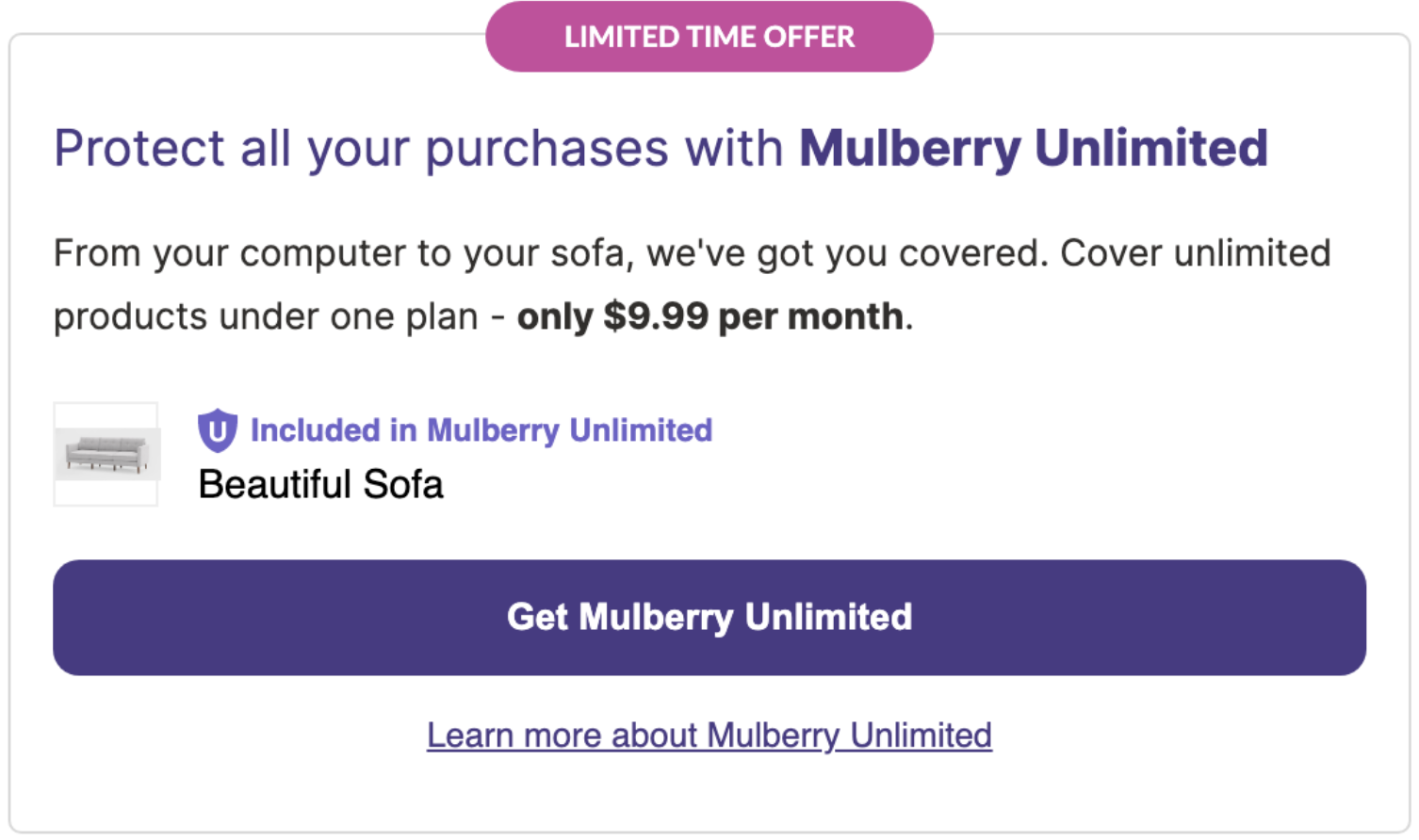
Customers who did not purchase Unlimited see a subscribe offer for the eligible products they bought, on the Order status page:
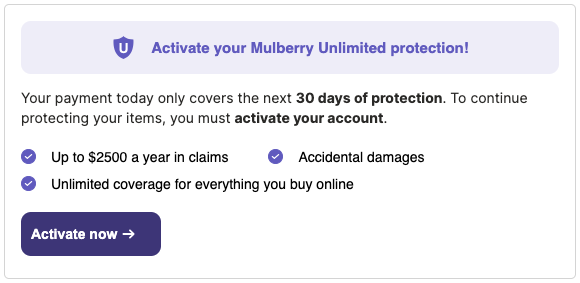
Customers who purchased Unlimited but haven't activated it yet see an activation placement:
Only activation shows if the component isn't enabledIf your Partner Success manager hasn't turned the component on (or
enable_subscription_order_success_offersis off for your account), the subscribe-offer path returns early. Only the activation placement renders, for customers who already purchased Unlimited.
Updated 4 months ago